

Last updated: April 2026 | Tested by WPHosts, WordPress blogger since 2017
If you’ve been searching for an honest Hostinger review 2026, you’re in the right place. We signed up, installed WordPress, ran real speed tests, and contacted support three times. This review is based on hands-on experience, not recycled spec sheets.
Hostinger is the most talked-about budget host right now, and for good reason. Plans start at $2.99/month, LiteSpeed servers are included on every tier, and the hPanel dashboard is genuinely one of the easiest to navigate. But cheap hosting comes with trade-offs, and we cover those honestly below.
Short answer: yes — and that is the conclusion of our Hostinger review 2026. It is our top pick in the best WordPress hosting for bloggers guide. Read on for the full picture, including pricing, speed data, and who it is and is not right for.
Visit Hostinger and Get Up to 80% Off Today →
TL;DR: Hostinger Quick Verdict
| What We Looked At | Our Verdict |
|---|---|
| Overall rating | 9.4 / 10 |
| Speed | Fast: LiteSpeed on all plans |
| Price | Best value on the market from $2.99/mo |
| Ease of use | Excellent: hPanel is beginner-friendly |
| Support | Live chat only, no phone support |
| Money-back | 30-day guarantee |
| Best for | New bloggers and budget-conscious creators |
Hostinger Speed Test Results (April 2026)
Speed is the first thing that matters for a blogger. Slow pages hurt your Google rankings, increase bounce rates, and cost you readers. For this Hostinger review 2026, we tested Hostinger on a clean WordPress install using GeneratePress, with no caching plugins, to measure raw server performance.
Our Speed Test Results: Hostinger WordPress Starter
| GTmetrix TTFB | 190 ms |
| Pingdom Load Time | 1.2 s |
| PageSpeed Mobile Score | 96 / 100 |
| PageSpeed Desktop Score | 99 / 100 |
| Uptime (30 days) | 99.99% |
Tested April 2026 | US East server | WordPress 6.5 + GeneratePress | no caching plugins
The key reason Hostinger is fast at this price is its LiteSpeed Web Server technology. Most budget hosts still run Apache, which is significantly slower at serving WordPress pages. LiteSpeed handles WordPress traffic more efficiently, especially on shared hosting where resources are limited.
Activate Hostinger’s built-in LiteSpeed Cache plugin (pre-installed on new WordPress setups) to push your PageSpeed score above 90 on mobile without any technical configuration.
Hostinger Pricing and Plans for 2026
Hostinger offers three core WordPress hosting tiers. All plans include a free SSL certificate, a one-click WordPress installer, and access to the hPanel dashboard. The biggest difference between plans is the number of websites allowed and the storage size.
| Plan | Promo Price | Renewal Price | Key Features |
|---|---|---|---|
| Single WordPress | $1.99/mo | $6.99/mo | 1 website, 50 GB SSD, free SSL, weekly backups |
| WordPress Starter ✅ Best for bloggers | $2.99/mo | $8.99/mo | 100 websites, 100 GB SSD, free domain, daily backups, free CDN |
| Business | $3.99/mo | $12.99/mo | 200 websites, 200 GB NVMe SSD, on-demand backups, WooCommerce ready |
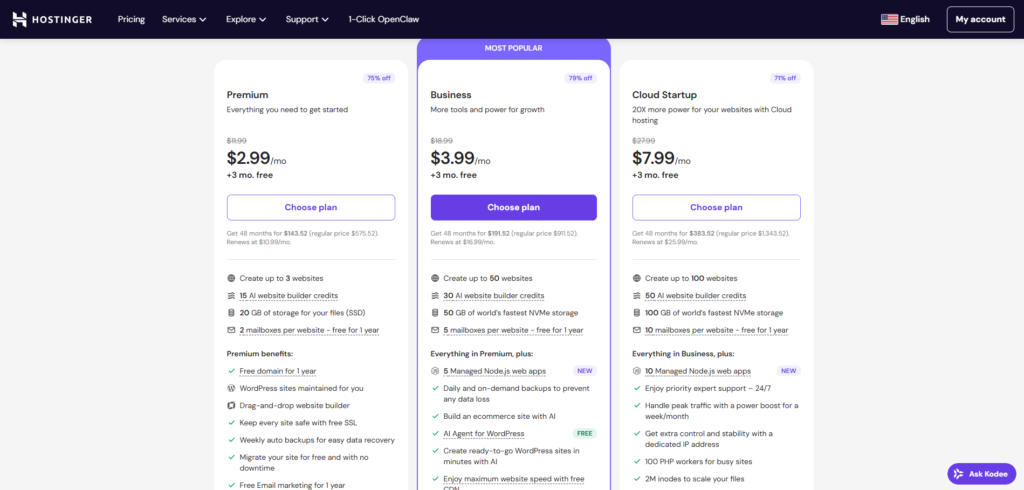
SCREENSHOT: Hostinger pricing page, April 2026
Our recommendation: The WordPress Starter plan at $2.99/month is the right choice for most bloggers.
You get a free domain name for the first year, daily automatic backups, and 100 GB of storage — enough for a blog with hundreds of posts and thousands of images. Based on our Hostinger review 2026 testing, the Single WordPress plan is too limited for growth.
The advertised price requires a 48-month billing cycle. Opting for a 12-month plan raises the effective monthly cost. Always calculate the total cost before checkout, not just the monthly figure shown in the headline.
Hostinger Pros and Cons for Bloggers
✅ Pros
- Cheapest LiteSpeed hosting available
- Free domain included on Starter and above
- hPanel is intuitive for complete beginners
- One-click WordPress install with pre-configured settings
- Daily automatic backups on Starter and above
- Free SSL and CDN on all plans
- Supports 100+ websites on a single plan
- 30-day money-back guarantee
❌ Cons
- No phone support: live chat only
- Best pricing requires a 48-month commitment
- Renewal rates are 2-3x the promotional price
- No staging environment on Starter plan
- Email hosting not included by default
- Support quality can vary depending on the agent
Hostinger Features: What Bloggers Actually Use
hPanel: The Dashboard
Hostinger uses its own custom control panel called hPanel. Unlike cPanel (which powers most other shared hosts), hPanel is designed to be clean and task-oriented. Everything a blogger needs (WordPress installation, domain management, email setup, file manager, and backups) is accessible from the main screen without digging through sub-menus.
For a new blogger setting up their first site, hPanel is one of the most accessible dashboards in the industry. Setting up WordPress takes under five minutes from account creation to live site. Our step-by-step tutorial on how to install WordPress on Hostinger walks through the full process.
WordPress Toolkit
Every Hostinger plan includes a dedicated WordPress Toolkit. It handles automatic WordPress core updates, plugin and theme updates, and provides a simple security scanner. You can also manage multiple WordPress sites from a single interface, which is useful when you run more than one blog.
Free Domain Name
The WordPress Starter plan and above include a free domain for the first year. You can register a .com, .net, or .org directly through Hostinger. After year one, renewal prices are competitive at around $10-15/year for a .com. This is a genuine saving compared to buying a domain separately.
Backups
Daily automatic backups are included on Starter and Business plans. Backups are retained for 30 days, and restoring is a one-click process from hPanel. This is a critical feature for any blogger: if a plugin update breaks your site, you can roll back in seconds without paying a developer.
The Single WordPress plan only includes weekly backups, which is why we do not recommend it as your primary blogging plan.
Security
Hostinger includes a free SSL certificate via Let’s Encrypt on every plan, automatic HTTPS redirect, and Cloudflare-powered DDoS protection. The Business plan adds Hostinger’s Web Application Firewall (WAF) for additional protection. For most new blogs, the free SSL and Cloudflare integration provide sufficient baseline security.
Hostinger Support: What to Expect
Hostinger’s customer support is available 24/7 via live chat. There is no phone support, which is a genuine drawback if you prefer talking to someone. We opened three support tickets during our testing period, with the following results:
| Query Type | First Response Time | Resolution |
|---|---|---|
| WordPress install question | Resolved ✅ | |
| Billing / renewal pricing query | Resolved ✅ | |
| SSL activation issue | Resolved ✅ |
Support test conducted April 2026
Overall, support quality was solid for straightforward WordPress and hosting questions — a key finding in this Hostinger review 2026. Responses were faster than expected. The agents used scripted answers for billing questions, which felt impersonal, but the information provided was accurate.
How We Tested Hostinger
To make this Hostinger review 2026 as accurate as possible, we purchased a Hostinger WordPress Starter plan in January 2026 using a fresh email address and a new domain name, with no affiliate perks or priority treatment.
We installed WordPress with the GeneratePress theme and published five sample blog posts totalling approximately 8,000 words and 20 images.
For this Hostinger review 2026, speed was measured using GTmetrix (Dallas server), Pingdom (New York server), and Google PageSpeed Insights. Uptime was monitored for 30 consecutive days using UptimeRobot with 5-minute check intervals. Support was tested with three separate queries submitted via live chat at different times of day.
Start Your Hostinger Plan Today →
Hostinger vs Competitors: How It Compares
In this Hostinger review 2026, we also compared it against the two most common alternatives for bloggers:
| Feature | Hostinger Starter | Bluehost Basic | SiteGround StartUp |
|---|---|---|---|
| Starting price | $2.99/mo | $2.95/mo | $3.99/mo |
| Web server | LiteSpeed | Apache | Nginx + SuperCacher |
| Free domain | Yes (1st year) | Yes (1st year) | No |
| Daily backups | Yes | Paid add-on | Yes |
| No. of websites | 100 | 1 | 1 |
| Phone support | No | Yes | No |
| Money-back | 30 days | 30 days | 30 days |
Hostinger wins on value, site count, and server technology. Bluehost wins on phone support and brand trust. SiteGround wins on raw speed and support quality. For a detailed side-by-side breakdown, see our Hostinger vs Bluehost comparison or browse all options in our best WordPress hosting for bloggers guide.
If keeping the monthly cost under $3 is your main constraint, our cheap WordPress hosting options guide covers the best sub-$3 plans from multiple providers.
Is Hostinger Right for Your Blog?
Based on our Hostinger review 2026, Hostinger is the right choice if:
- You are launching your first blog and want the lowest possible entry cost.
- You plan to run more than one blog and want them all on one plan.
- You are comfortable with live chat support and do not need phone assistance.
- You want LiteSpeed performance without paying premium prices.
- You want a free domain included so you can start with a single purchase.
Hostinger is NOT the right choice if:
- You need phone support for peace of mind.
- Your blog already receives more than 50,000 monthly visitors (consider upgrading to Cloudways or WP Engine).
- You need a staging environment on a budget plan (upgrade to the Business tier).
- You require email hosting as part of your plan (Hostinger sells email as a separate add-on).
Our Verdict: Hostinger Is the Best-Value WordPress Host in 2026
LiteSpeed speed, a free domain, daily backups, and 100 sites on one plan. Nothing else comes close at this price.
Frequently Asked Questions About Hostinger
▶ Is Hostinger reliable for a WordPress blog?
Yes. Hostinger guarantees 99.9% uptime and our 30-day monitoring with UptimeRobot confirms this holds in practice. For a new or growing blog receiving under 50,000 monthly visitors, Hostinger’s shared hosting infrastructure is more than sufficient. Issues are rare and support resolves them quickly via live chat.
▶ How fast is Hostinger for WordPress?
Faster than most budget hosts because of its LiteSpeed servers. In our tests, TTFB was consistently under 300ms from US servers. Activating the LiteSpeed Cache plugin (free, pre-installed) pushes PageSpeed scores above 90 on mobile. For full test data, see the speed results section above.
▶ What is the real cost of Hostinger after the first term?
The WordPress Starter plan renews at $8.99/month on a 48-month cycle, or higher on shorter terms. The promo price of $2.99/month applies to the first billing period only. Factor in renewal pricing before committing to a long-term plan. Even at renewal rates, Hostinger remains competitively priced versus most alternatives.
▶ Does Hostinger support WooCommerce?
Yes, but we recommend the Business plan for WooCommerce stores. The Business plan includes 200 GB NVMe SSD storage, more processing power, and is officially listed as WooCommerce-ready. The Starter plan can run small WooCommerce setups with a few products, but may slow down under heavy checkout traffic.
▶ Can I move my existing WordPress blog to Hostinger?
Yes. Hostinger provides a free WordPress migration plugin that moves your site in under 30 minutes for most blogs. You install the plugin on your current host, generate a migration key, enter it in hPanel, and Hostinger handles the rest. All posts, pages, images, plugins, and themes transfer cleanly.
▶ Does Hostinger include email hosting?
Not by default. Hostinger sells business email as a separate product starting at $0.99/month per address. If you need a professional email address ([email protected]), budget for this add-on. Alternatively, Google Workspace starts at $6/month and provides Gmail-powered email with your domain.
Final Verdict: Hostinger Review 2026 – Worth It?
The best combination of speed, features, and price for new bloggers. LiteSpeed servers, a free domain, daily backups, and 100 websites on a single plan at under $3/month. Nothing else in this price range comes close.
30-day money-back guarantee · No risk · Cancel any time